TRIM(both ‘()’ from col) - remove characters from column
3 arguments
where to remove both, leading, trailing
2.what to remove (should be put in quotes)
3.which col to remove
POSITION, STRPOS - Case sensitive
for find the position number of a character in a string
POSITION(‘A’ on colname) or STRPOS(colname, ‘A’)
SUBSTR
for finding the substring
SUBSTR(colname, 4, 2) - substr(colname, starting pos, num chars)
CONCAT
concatenate two or 3 strings
CONCAT(col1, ‘hello’, LEFT(col2, 4))
UPPER, LOWER
turning strings into cases
COALESCE to replace null values with a string
COALESCE(colname, ’no desc’)
Window functions
A window function performs a calculation across a set of table rows that are somehow related to the current row. This is comparable to the type of calculation that can be done with an aggregate function. But unlike regular aggregate functions, use of a window function does not cause rows to become grouped into a single output row — the rows retain their separate identities. Behind the scenes, the window function is able to access more than just the current row of the query result.
FORMAT () OVER ()
(aggregate function) OVER (partition by col or order by col)
Functions
All aggregate functions will work
ROW_NUMBER()
RANK() and DENSE_RANK()
row number will give different numbers irrespective of values being same
rank will give same numbers(rank) for same values but the next rank would be skipped
dense rank is same as rank but the next rank will not be skipped
NTILE(num)
this will divide the partition column into number of buckets specified by num and give where a given row falls into
NTILE(4) - quartile
NTILE(5) - quintile
NTILE(100) - percentile
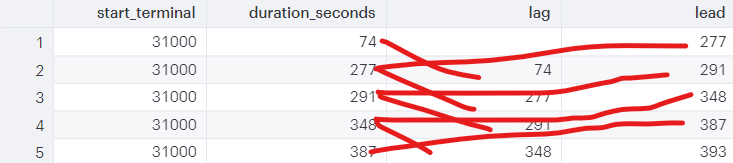
LAG() and LEAD()
LAG is the one before
LEAD will give the value of the row after
        - LAG(colname, 2) will skip 2 rows instead of 1
    - WINDOW statement
        -

            SELECT start_terminal,
                   duration_seconds,
                   NTILE(4) OVER ntile_window AS quartile,
                   NTILE(5) OVER ntile_window AS quintile,
                   NTILE(100) OVER ntile_window AS percentile
              FROM tutorial.dc_bikeshare_q1_2012
            WINDOW ntile_window AS
                     (PARTITION BY start_terminal ORDER BY duration_seconds
Performance tuning
Reducing table size
use filters using WHERE
Use LIMITS in joining or subqueries if you are just testing out the functionality of the query and are not actually looking at the results
JOINS
Aggregates before join if possible
EXPLAIN to get an understanding of how the query will execute